
Korean Baseball AI Prompt
Create the viral KBO-style moment where a stadium camera randomly catches you in the crowd, then turn the approved frame into a short fan cam video.
Broadcast Fan Cam Generator
Upload a selfie, make the live-TV screenshot, approve the frame, then animate it into a 5-second fan cam.
Selfie reference
Use a clear portrait. The prompt keeps identity stable and avoids real team logos.
Step 1: broadcast screenshot
Upload a selfie and generate the broadcast frame.
Step 2: fan cam video
Approve the screenshot first to unlock video generation.
What Is the Korean Baseball AI Trend?
The Korean baseball AI trend recreates the feeling of being randomly caught by a live broadcast camera while sitting in the stands at a Korean professional baseball game.
Korean Baseball AI Trend on X
Prompt Examples
These prompts are loaded from the page locale configuration and used by the generator.
Image prompt
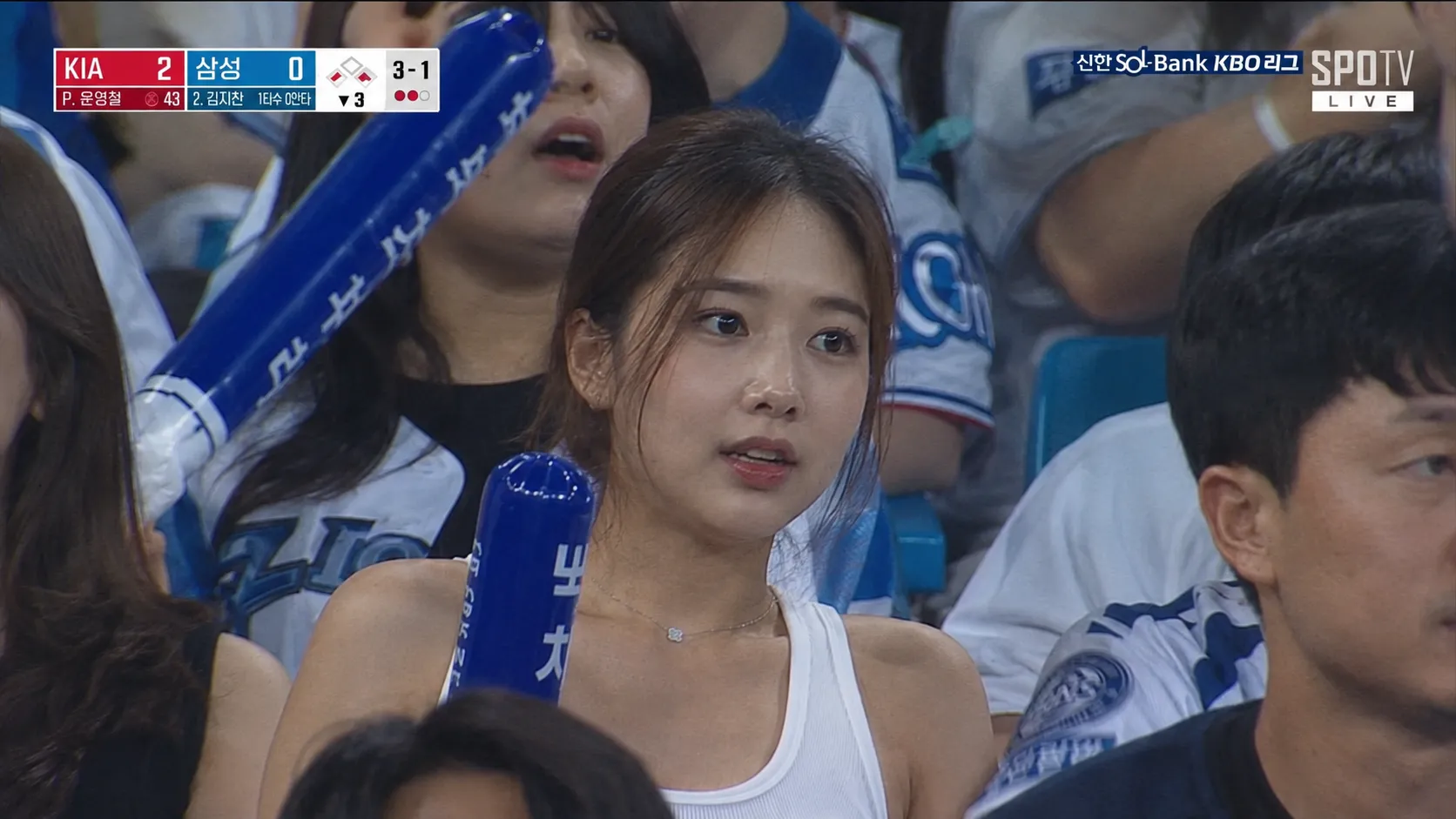
Transform the person in the image into a realistic documentary-style sports broadcast screenshot, set in the spectator stands of a Korean professional baseball stadium. The uploaded person should appear as if they were naturally captured by a live sports broadcast camera, sitting among the crowd at a Korean Baseball Organization (KBO) game.

This must not look like a model shoot, influencer-style portrait, or heavily retouched beauty photo.

The pose should feel slightly reserved and casual, like an unplanned candid shot. Preserve natural facial asymmetry, real skin texture, clearly visible pores, slightly messy stray hairs, and a subtle oily sheen on the face caused by the humid stadium environment. The image should include slight motion blur, compression noise, interlaced broadcast scan quality, soft focus from a telephoto lens, and uneven on-site stadium lighting.

The person is wearing a simple white sleeveless top, seated comfortably while watching the game, with cheering props placed nearby. Other spectators should be seated around them, and the background should be a lively, vivid, detail-rich baseball stadium environment.

The facial expression should feel like a genuinely unintentional moment caught by the camera: curious, distracted, and slightly startled or surprised.

The overall texture and visual style should resemble a Korean SPOTV KBO baseball live broadcast, with the feel of an accidental crowd-camera capture, faithfully recreating a real sports live broadcast shot.

No beauty retouching of any kind is allowed: do not enlarge the eyes, do not create a V-shaped jawline, no porcelain-white skin smoothing, no fake flawless skin texture, no influencer vibe, no fashion editorial look, and no AI beauty filter effect.
Video prompt
Animate the approved first frame as a realistic 5-second Korean baseball broadcast fan cam moment.

Keep the person's identity, face, outfit, seat position, and first-frame composition stable.

The person goes from watching the game seriously to suddenly realizing they are being filmed, then smiles and gestures toward the camera.

Use subtle handheld broadcast camera movement, tiny head and eye motion, natural breathing, surrounding crowd movement, waving cheering sticks, slight motion blur, stadium ambience, and compressed live-TV texture.

Do not morph the face, change the outfit, add beauty retouching, cut to another shot, add fake team logos, or create a glossy AI music-video look.
Best Settings
Use broadcast realism and restraint. The trend works when the frame looks slightly imperfect.
16:9 for broadcast screenshots
Use horizontal framing when you want the result to feel like a TV capture.
9:16 for TikTok and Reels
Use vertical framing when the final video is meant for short-form feeds.
4-5 seconds for fan cam video
Short clips work best: subtle camera movement, small facial motion, and crowd energy.
Natural texture over beauty polish
Ask for realistic skin texture, broadcast compression, and slight motion blur. Avoid plastic AI skin.
FAQ
What is the Korean Baseball AI trend?
It is a selfie-to-stadium style where AI makes you look like a spectator randomly shown on a Korean baseball live broadcast or fan cam.
How do I make the baseball AI trend?
Upload a selfie, choose an aspect ratio, generate the broadcast screenshot, approve the first frame, then create the video.
Should I worry about privacy when uploading a selfie?
Your selfie is used only for this image and video generation flow. It is not used for any other purpose or for model training. The image is uploaded to site storage and sent to the image model service as the generation reference. Only upload photos you have the right to use and are comfortable using for AI generation, and avoid ID documents, children's photos, or other sensitive images. See the privacy policy for more details.
Can I use ChatGPT?
Yes. The screenshot step uses GPT Image 2, with your selfie as the identity reference.
How do I turn the image into a video?
After the screenshot is generated, approve it as the first frame. The page sends that frame to Seedance 2.0 for image-to-video animation.
What prompt works best for Kling or Seedance?
Use the screenshot as the first frame and ask for subtle fan cam movement, stable identity, crowd motion, broadcast compression, and no glossy AI retouching.